USB-C or USB-A flash drive? How to choose a USB flash drive for a company?
USB-C or USB-A flash drive? Choosing a USB flash drive for a company
A flash drive has remained one of the most universal data carriers used in business communication for years. Despite the development of the cloud and file-sharing services, a physical USB flash drive with a logo still finds application during conferences, trade fairs, presentations, training sessions, sales meetings, or as part of a set for employees and clients.
The modern choice, however, is not limited only to capacity or housing design. The USB connector type is increasingly important. In practice, companies most often face the question: choose classic USB-A, modern USB-C, or opt for a 2-in-1 USB flash drive that combines both standards?
The answer depends on what devices the recipients will use, what files will be transferred, and what character the promotional gadget is supposed to have.
In this article, we explain how USB-C and USB-A flash drives differ, when it is worth choosing a 2-in-1 drive with OTG, what to pay attention to regarding capacity, and how to match the carrier to a specific B2B project.
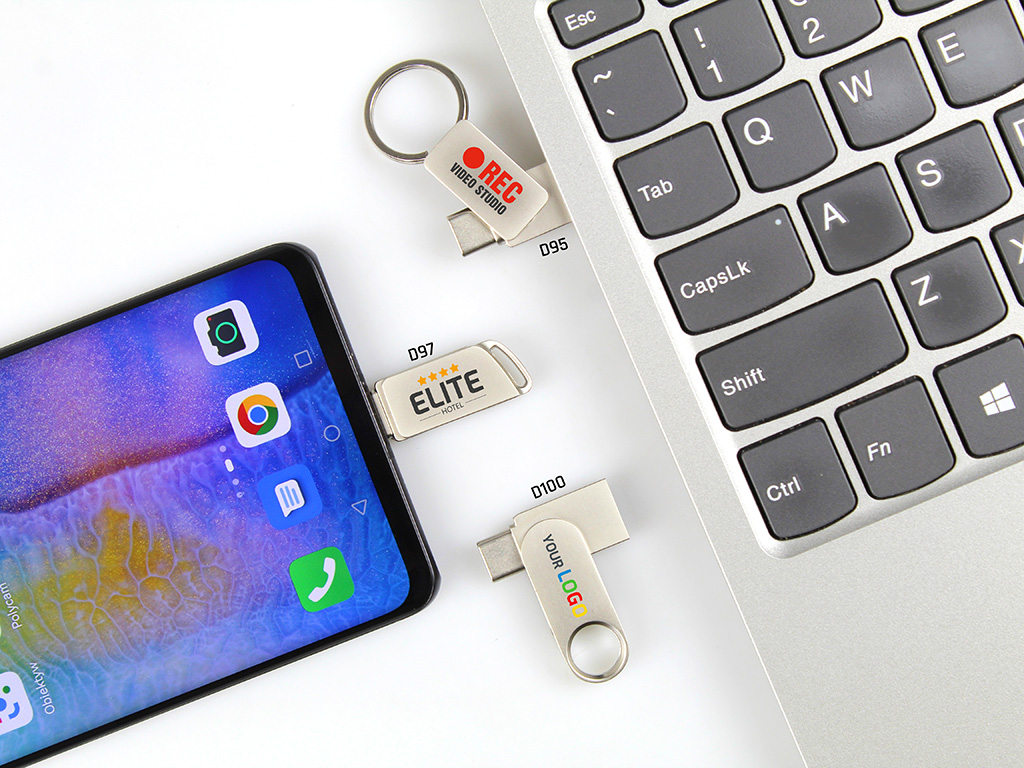
Table of contents
-
USB-A and USB-C – how do the two connectors differ?
-
Does USB-C mean a faster USB flash drive?
-
2-in-1 flash drive – a solution for various devices
-
What is OTG and why does it matter in business?
-
USB-A or USB-C – which variant to choose?
-
How to choose the USB flash drive capacity?
-
USB 2.0, USB 3.0, and PSSD – why is it worth looking beyond the connector?
-
Which flash drive to choose for various B2B applications?
-
USB flash drive design and form matter
-
Marking USB-A and USB-C flash drives
-
The ability to preload company materials
-
Common mistakes when choosing a USB flash drive
-
Summary
-
FAQ
1. USB-A and USB-C – how do the two connectors differ?
The most important difference is very simple: USB-A and USB-C are two different types of connectors.
USB-A is a classic standard that has been used for years in desktop computers, laptops, hubs, monitors, and many other devices. Due to its high popularity, it still remains a very practical solution in B2B projects, especially when the recipients are users working primarily on computers and devices equipped with traditional USB ports.
USB-C is a newer type of connector found in many modern laptops, tablets, and smartphones. The Blueboat offer includes, among others, multifunctional 2-in-1 USB-C flash drives, equipped with both USB-A and USB-C.
For a company, this primarily means the ability to adapt the drive to the user's way of working.
USB-A
It will work especially well when:
-
the flash drive will be used mainly with classic computers,
-
the recipients are users of older or mixed equipment,
-
broad compatibility with traditional ports is most important,
-
the gadget is meant to be simple and economical.
USB-C
It is worth considering when:
-
recipients use modern laptops,
-
the drive is meant to work with mobile devices,
-
direct file transfer between a computer and a smartphone is important,
-
the company wants to opt for a more mobile solution.
The most important thing, however, is that the connector type itself does not say everything about the drive's capabilities. When choosing, it is also worth analyzing the transmission standard, capacity, design, and purpose of a specific model.
2. Does USB-C mean a faster USB flash drive?
Not always.
This is one of the most important points when choosing a USB-C flash drive. The connector type and data transfer speed are two different issues.
The Blueboat offer includes both classic USB flash drives and 2-in-1 USB-C models, as well as carriers designated as USB 3.0 or PSSD 3.1. This means that before choosing a specific product, it is worth checking not only the plug type but also the actual memory standard.
Therefore, a simple rule can be adopted:
USB-C is responsible for the connector type, while the memory and controller standard is important for data transfer capabilities.
This is particularly important when the flash drive is to serve not only as a carrier of promotional materials but also as a work tool for transferring larger files.
If the recipients are to use large presentations, video materials, catalogs, technical documentation, or other demanding files, it is also worth paying attention to the data transfer speed.
For more demanding projects, the offer also includes SSD and PSSD 3.1 drives designed for fast data transfer.
3. 2-in-1 flash drive – a solution for various devices
If the company does not know exactly all the devices the recipients will use, a 2-in-1 USB-A + USB-C flash drive can be a very practical solution.
Such a carrier is equipped with two different connectors, making it a universal bridge between older and newer devices.
The user can use it, for example, to transfer files between:
-
a computer equipped with USB-A,
-
a modern laptop with USB-C,
-
a tablet,
-
a smartphone supporting the appropriate OTG function.
Blueboat materials point precisely to such a way of using 2-in-1 USB-C memory – as a solution enabling direct data exchange between a computer and mobile devices.
This makes a 2-in-1 flash drive with a logo a very good solution for campaigns directed at a wide and diverse target audience.
When is it worth choosing 2-in-1?
Especially when:
-
the company does not want to limit the gadget to one type of port,
-
recipients use various devices,
-
the flash drive is also meant for mobile work,
-
files are to be easily transferred between a computer and a smartphone,
-
versatility is more important than a minimalist design.
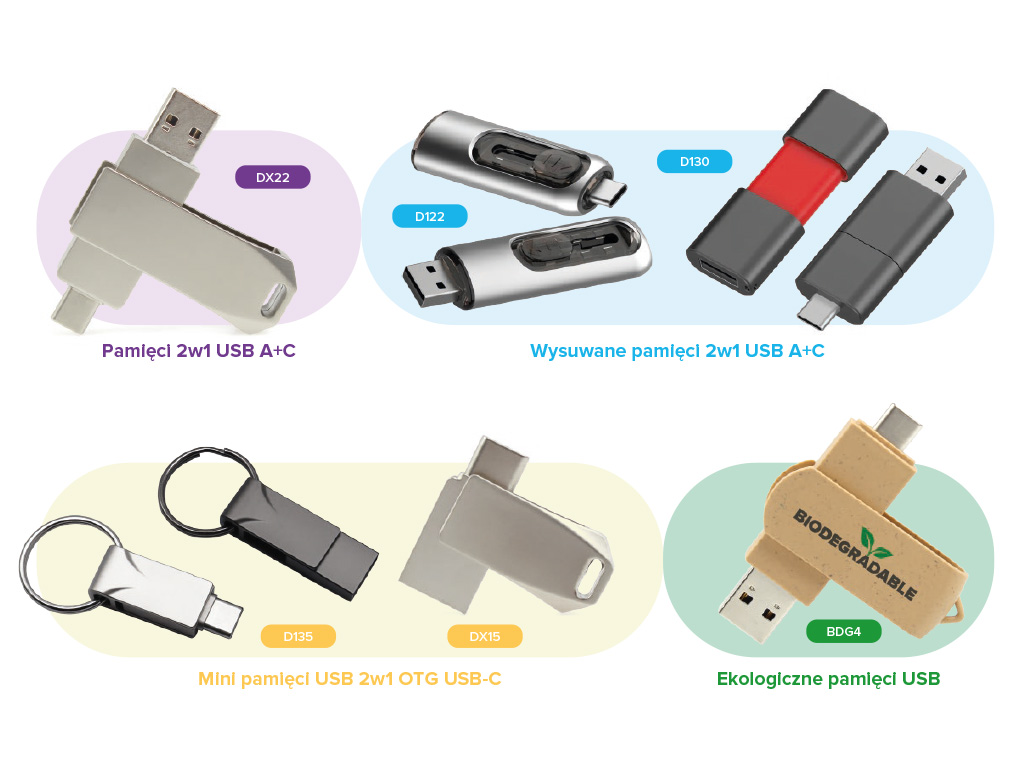
The offered models include, among others, 2-in-1 OTG USB-C flash drives, swivel versions, miniature versions, and models with additional illumination or elements facilitating mobile use.
4. What is OTG and why does it matter in business?
OTG (On-The-Go) means the ability of direct communication between a compatible mobile device and a USB flash drive.
In practice, this means that an appropriate USB-C OTG flash drive can allow file transfer without the need to use a computer.
For a business user, this can be convenient, for example, during:
-
a meeting with a client,
-
a business trip,
-
a presentation,
-
work outside the office,
-
transferring photos or documents,
-
quick copying of materials between devices.
Blueboat materials indicate that 2-in-1 USB-C drives can be used for direct file transfer between a computer, smartphone, and tablet, provided the mobile device supports the appropriate function.
However, OTG does not mean full compatibility with all devices
Before choosing a specific model, you should check the requirements of the mobile device and its support for the appropriate function.
Therefore, for larger B2B projects, it is worth defining already at the brief stage:
what devices is the USB flash drive supposed to work with?
This is simpler and safer than choosing a carrier solely based on attractive appearance.
5. USB-A or USB-C – which variant to choose?
There is no single answer for every campaign.
The right choice depends primarily on the target audience.
| Criterion | USB-A | USB-C | USB-A + USB-C 2-in-1 |
|---|---|---|---|
| Classic computers | very good fit | depending on ports | very good |
| Modern laptops | depending on the model | very good | very good |
| Smartphones and tablets | limited | good in OTG-compatible devices | very good |
| Versatility | high in older ecosystems | high in modern devices | highest |
| Mobile work | moderate | high | very high |
| One gadget for various recipients | good solution for a known environment | good for a modern target group | particularly practical |
When USB-A?
A USB-A flash drive with a logo can be the right choice when:
-
the project is directed at a broad group of computer users,
-
the main application will be distributing materials during events,
-
recipients primarily use classic ports,
-
a simple and proven design is what counts.
When USB-C?
A USB-C flash drive with a logo is worth considering when:
-
the product is to be used with modern equipment,
-
recipients work on the go,
-
the ability to use mobile devices is important,
-
the company targets the gadget at users of next-generation technology.
When 2-in-1?
A 2-in-1 USB-A + USB-C flash drive is particularly interesting when the target audience is diverse and you do not want to limit the gadget's application to one type of port.
That is why 2-in-1 models are an interesting choice for extensive B2B campaigns.
6. How to choose the USB flash drive capacity?
The connector type is just one of the parameters. The second is the USB flash drive capacity.
Depending on the model, Blueboat offers carriers from small capacities, through popular business variants, to high capacities intended for more demanding users. The offer includes, among others, 1GB, 2GB, 16GB, 32GB, 64GB, 128GB, 256GB, and 512GB, as well as SSD/PSSD solutions.
Smaller capacities
Smaller drives may be sufficient if the flash drive is to contain:
-
a company presentation,
-
a catalog,
-
PDF materials,
-
basic documents,
-
a small package of conference materials.
16–64GB
This is the range indicated in materials regarding 2-in-1 USB-C drives as frequently chosen by B2B clients. Such capacity can be a practical compromise between functionality, size, and business application.
128GB and more
Higher capacities can be justified when the carrier is to be used for larger data sets, multimedia materials, documentation, or more demanding professional applications.
For very demanding projects, it is also worth considering PSSD 3.1 if fast data transfer is a priority.
7. USB 2.0, USB 3.0, and PSSD – why is it worth looking beyond the connector?
When choosing a USB flash drive, it is easy to focus solely on the question:
USB-A or USB-C?
Meanwhile, for some users, an equally important question will be:
how fast does the drive read and write data?
The Blueboat offer includes both classic flash drives, USB 3.0 models, and miniature PSSD 3.1 drives.
This is an important distinction because:
the connector type does not replace information about the transfer standard.
Therefore, when choosing a product for a specific campaign, it is worth specifying separately:
-
connector type,
-
compatibility,
-
capacity,
-
transmission standard,
-
product purpose.
Thanks to this, the carrier can be matched to the user's actual needs, rather than choosing a product based solely on its appearance.
8. Which flash drive to choose for various B2B applications?
Conference or trade fair
If the flash drive is to be distributed during an event and primarily contain presentations, catalogs, or company materials, you can opt for a universal model with standard capacity.
In this case, the product form and marking method also matter.
Business clients
For partners and clients, you can consider a more elegant flash drive with a logo, e.g., a metal, miniature model, or one with additional features.
Employees and onboarding
In the case of welcome packs, a functional 2-in-1 USB-C flash drive can be an interesting solution, which will be useful both when working with a computer and mobile devices.
Technology industries
For clients from the IT sector, new technologies, or creative industries, you can consider drives equipped with modern interfaces or faster memory solutions.
Eco-friendly projects
If consistency with the brand's environmental communication is important, eco-friendly USB flash drives made of, among others, wood, bamboo, recycled paper, or biodegradable composites are also available.
Mobile gadgets
If small dimensions and portability are most important, it is worth checking out mini USB flash drives, which were designed with mobility and discreet use in mind.
9. USB flash drive design and form matter
In the case of B2B gadgets, functionality is just one element of the entire project.
Blueboat offers many different USB flash drive designs, from classic models to mini variants, with a carabiner, eco-friendly, illuminated, or made in a custom shape.
Mini USB flash drive
A miniature design will work well when the most important things are:
-
mobility,
-
discretion,
-
small dimensions,
-
ease of storage.
USB flash drive with a carabiner
A model with a carabiner can be a good solution for mobile recipients. Thanks to the clip, the flash drive can be attached to keys, a bag, or a lanyard. This category also includes metal models designed for intensive use.
USB flash drive with an illuminated logo
If the goal is a strong visual effect, you can use USB flash drives with an illuminated logo. The illumination turns on when connected to a port and allows for additional exposure of the brand mark during use.
Custom shape USB flash drive
In Custom Made projects, you can depart from the standard housing and create a flash drive in a custom shape – e.g., inspired by a product, logotype, or characteristic brand element. Blueboat materials indicate the use of Soft PVC and the possibility of designing 2D and 3D forms.
10. Marking USB-A and USB-C flash drives
Regardless of whether you choose a USB-A flash drive, USB-C, or a 2-in-1 model, it is worth treating the marking method as part of the entire project.
Blueboat materials include, among others:
-
laser engraving,
-
UV printing,
-
pad printing,
-
in selected models also an illuminated logo.
On metal surfaces, engraving can highlight the technical and premium character of the product. A colorful print will work well when accurate reproduction of visual identity is important.
For larger projects, you can also consider custom drive design and matching the colors to the brand.
More information can be found in the Promotional gadget marking section.
11. The ability to preload company materials
One of the additional features that can increase the utility of a promotional flash drive is the ability to preload data.
Depending on the project, you can prepare, for example, the following on the drive:
-
a company catalog,
-
a presentation,
-
product documentation,
-
training materials,
-
promotional videos,
-
materials for clients.
Blueboat offers a service of preloading data onto carriers, and in selected projects, it is also possible to protect files against accidental deletion by the recipient.
This is particularly interesting for:
-
conferences,
-
trade fairs,
-
sales presentations,
-
training sessions,
-
product materials.
In such an application, the flash drive ceases to be merely a promotional gadget and simultaneously becomes a physical carrier of brand content.
12. Common mistakes when choosing a USB flash drive
Mistake 1: choosing solely based on appearance
A striking housing will not replace proper compatibility.
First, you must determine what devices the product will work with.
Mistake 2: assuming that USB-C automatically means higher speed
USB-C is a connector type, not an automatic guarantee of a specific data transfer.
You must check the specific memory specification.
Mistake 3: choosing too small a capacity
If the flash drive is to contain not only PDFs but also videos, presentations, and larger catalogs, a small capacity can quickly become a limitation.
Mistake 4: ignoring mobile devices
If the target audience uses smartphones and tablets, classic USB-A may not be universal enough.
In this case, it is worth considering a 2-in-1 USB-C flash drive.
Mistake 5: lack of information about the purpose
A different product will be suitable for a mass event, a different one for an employee welcome pack, and yet another as a gift for a key client.
Mistake 6: treating branding as an afterthought
In the case of a B2B gadget, the marking method directly affects its reception. The marking technology should be matched to the material and construction of the product.
13. Summary
The choice between a USB-A and USB-C flash drive should result primarily from the devices used by the recipients, and not solely from the relevance of a specific standard.
USB-A remains a practical solution for a traditional computer environment. USB-C meets the needs of more mobile users utilizing modern laptops, tablets, and smartphones. In turn, a 2-in-1 USB-A + USB-C flash drive allows combining both worlds and reducing the compatibility problem.
When choosing a USB flash drive, it is worth simultaneously analyzing:
1. Connector type
USB-A, USB-C, or 2-in-1.
2. Compatibility
Computers, laptops, smartphones, tablets.
3. Capacity
From small capacities to 128GB, 256GB, or 512GB solutions.
4. Transfer standard
Not only the connector type but also the memory capabilities.
5. Product form
Classic, mini, with a carabiner, eco-friendly, illuminated, or custom.
6. Marking method
Engraving, UV, pad printing, or illuminated logo – depending on the construction.
A wide range of promotional USB flash drives is available at Blueboat, including 2-in-1 multifunctional USB-C flash drives, mini USB flash drives, USB flash drives with a carabiner, eco-friendly USB flash drives, USB flash drives with an illuminated logo, and custom shape USB flash drives.
A properly selected flash drive with a logo can combine the function of a data carrier, a practical work tool, and a durable brand carrier. Therefore, in B2B projects, it is worth choosing it not only by appearance but above all by how the end recipient will use it.
Frequently Asked Questions (FAQ)
Yes. Designs based on Soft PVC, among others, are available, with the ability to create 2D and 3D shapes tailored to your brand.
There is no universal answer. USB-C is better suited for modern mobile devices and some new laptops, while USB-A remains a very popular solution in classic computer hardware. For a diverse target audience, a 2-in-1 model can be a practical solution.
It is a flash drive equipped with two different connectors – USB-A and USB-C. This allows you to use a single drive with various devices.
OTG (On-The-Go) allows direct communication between a compatible mobile device and a USB flash drive, e.g., transferring files without using a computer.
This should not be assumed automatically. The device must support the relevant function and be compatible with the given solution.
It depends on the application. For 2-in-1 USB-C drives, Blueboat's materials indicate the 16–64GB range is often chosen by B2B clients, though larger capacities are also available.
Not automatically. Transfer speed is also determined by the memory and electronics standard used.
Yes. Blueboat offers the option of pre-loading materials such as presentations, catalogs, or promotional videos.