Fast 60W+ promotional cables – Power Delivery in B2B
Fast 60W+ promotional cables: how Power Delivery works and how to choose a cable for B2B applications?
In the business environment, smartphones, tablets, and laptops are basic work tools. At the same time, these devices require increasingly efficient power sources, which is why a classic USB cable is no longer a sufficient solution in many applications.
Fast 60W+ promotional cables respond to this trend, combining the function of a practical accessory with the possibility of professional branding. Depending on the model, they can handle 60W, 100W, and even 240W, support USB Power Delivery, data transmission, CarPlay and Android Auto, and offer additional design solutions.
For companies and advertising agencies, however, it is not only important how many watts the manufacturer declares. Charging power, Power Delivery standard, the presence of an E-Marker, data transmission speed, type of connectors, and device compatibility are parameters that should be considered together.
In this article, we explain how fast USB cables work, how the 60W, 100W, and 240W variants differ, and how to choose the right model for a B2B campaign, welcome pack, event, or premium set.
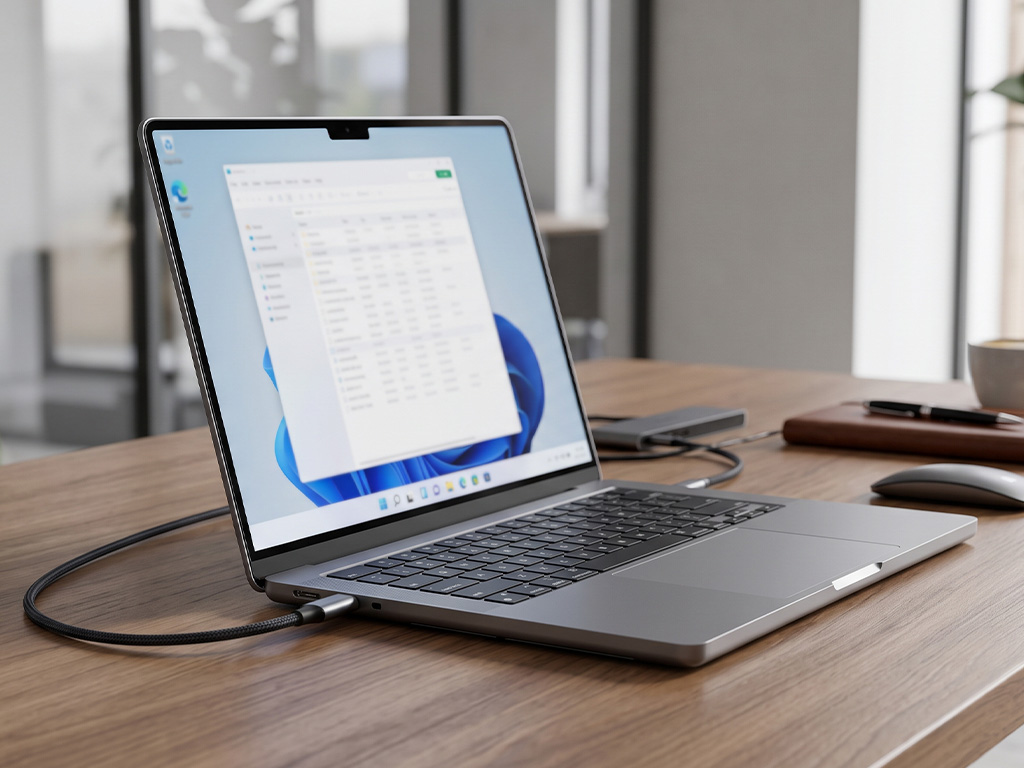
Table of contents
-
What is USB Power Delivery and how does it work?
-
Why doesn't a 60W, 100W, or 240W cable always mean the same charging power?
-
60W vs 100W vs 240W – the most important differences
-
E-Marker – what is it and why does it matter?
-
Charging power vs. data transfer – two different parameters
-
How to choose a USB cable for a smartphone, tablet, and laptop?
-
Additional features that increase the value of the gadget
-
Fast USB cables as a B2B promotional gadget
-
How to mark fast promotional cables?
-
Common mistakes when choosing USB cables
-
How to combine cables with other technological gadgets?
-
Summary
-
FAQ – frequently asked questions about fast USB cables
1. What is USB Power Delivery and how does it work?
USB Power Delivery, or USB PD, is a communication standard between a charger and a compatible device. Its task is to allow the power parameters to be matched to the capabilities of a specific set of devices.
In practice, this means that the cable itself does not "force" a specific power on a smartphone or laptop. The final charging parameters depend on the compatibility of the entire system: the power source, the cable, and the device.
Therefore, a 100W USB cable can be intended for charging both laptops and devices with significantly lower energy demand. The device uses power appropriate for its specifications, not automatically the maximum value declared for the cable.
In B2B applications, this is important because one well-chosen USB-C cable with a logo can handle many different end-user devices.
There are also other fast charging technologies on the market, such as Quick Charge. However, in the case of higher power levels and modern laptops, USB Power Delivery is of particular importance.
If you are looking for a solution for a set with other mobile electronics, it is also worth checking the offer of fast charging power banks.
2. Why doesn't a 60W, 100W, or 240W cable always mean the same charging power?
This is one of the most important aspects when choosing a fast cable.
The information "100W" or "240W" specifies the maximum power with which a given cable can operate under appropriate conditions. However, it does not mean that every connected device will be charged with exactly this power.
The final effect is primarily influenced by:
-
the capabilities of the charger,
-
the requirements of the device,
-
supported USB Power Delivery profiles,
-
cable parameters,
-
the presence of an appropriate E-Marker chip,
-
the quality and construction of the wire.
So the whole process can be simplified to the relationship:
charger + cable + device = actual charging power
For example, a 100W cable connected to a smartphone supporting lower power will not make the phone start drawing 100W. In turn, a laptop requiring higher power may need both an appropriate power adapter and a cable supporting the required power profile.
Therefore, for promotional projects, it is not worth choosing a cable solely based on the highest number printed on the packaging. It is much more important to match the product's parameters to the target group.
3. 60W vs 100W vs 240W – the most important differences
In the case of fast charging 60W+ USB cables, we most often encounter 60W, 100W, and 240W variants.
| Parameter | 60W | 100W | 240W |
|---|---|---|---|
| Maximum power | up to 60W | up to 100W | up to 240W |
| Typical application | smartphones, tablets, some laptops | laptops, ultrabooks, business devices | more demanding laptops and specialized equipment |
| Power Delivery | depending on the model | depending on the model | appropriate USB PD profiles, including solutions utilizing PD 3.1 |
| E-Marker | depending on the construction | important with appropriate cable parameters | required for specific high-current configurations |
| Promotional application | wide audience | business and premium segment | tech users and specialized projects |
60W cables
A 60W USB cable is a universal choice for a wide range of users. It can work well with smartphones, tablets, and many basic laptop applications.
This variant is particularly interesting for larger campaigns, events, and projects where the combination of utility and a broad audience matters.
100W cables
A 100W USB cable is a natural choice where recipients use business laptops, ultrabooks, and more demanding equipment.
In B2B campaigns, it can act as a more advanced gadget, especially in welcome packs, kits for employees, business clients, or participants in specialized events.
240W cables
A 240W USB cable is a solution for more demanding applications. Its potential is particularly interesting in projects aimed at users of advanced electronics.
However, this does not mean that every recipient needs 240W. In most campaigns, it is much more important to properly match the parameters to the target group's devices than to choose the highest available power.
See available fast charging 60W+ USB cables.
4. E-Marker – what is it and why does it matter?
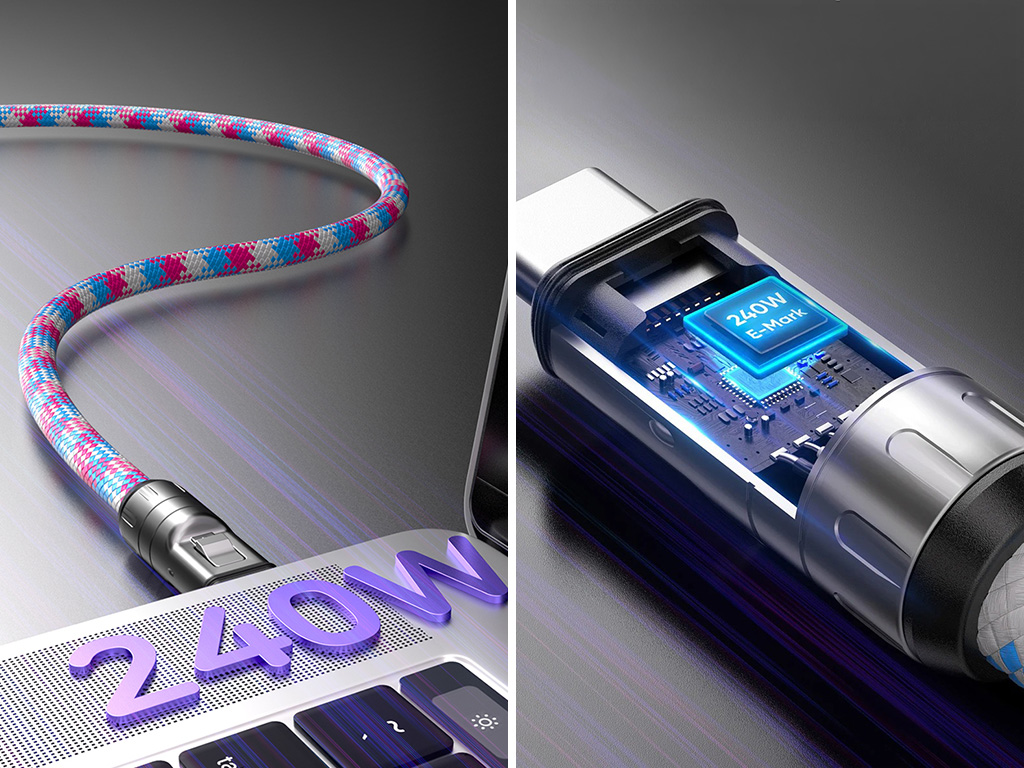
In the case of USB-C cables supporting higher power parameters, it is worth paying attention to the E-Marker, an electronic chip located inside an appropriately equipped cable.
Its task is to transmit information regarding the cable's capabilities and supported parameters.
For the end-user, the most important conclusion is simple:
the more advanced the cable, the more important the detailed parameters of its construction become, rather than just the information "60W", "100W", or "240W".
The E-Marker is of particular importance in configurations utilizing higher current values. Therefore, for projects based on fast cables for laptops, it is worth analyzing the full specifications of a specific model.
This is especially important for advertising agencies preparing gadgets for clients from the technology, IT, automotive, or engineering industries.
5. Charging power vs. data transfer – two different parameters
This is one of the most frequently overlooked aspects when choosing USB-C cables.
Charging power and data transfer speed are not the same parameter.
A cable can handle high charging power, but it does not necessarily have to provide the highest available data transmission speed at the same time. Therefore, before ordering, it is worth checking separately:
-
maximum charging power,
-
USB Power Delivery support,
-
data transmission capability,
-
compatibility with specific devices,
-
support for Apple CarPlay and Android Auto, if required,
-
types of available connectors.
This is of particular importance in automotive B2B applications.
A cable used solely for charging does not have to offer the features required for a stable connection between a phone and a car's multimedia system.
Therefore, for promotional projects, it is worth determining right at the beginning whether the cable is meant to be primarily:
for charging,
for charging and data transmission,
or a universal solution for mobile and automotive applications.
6. How to choose a USB cable for a smartphone, tablet, and laptop?
There is no single perfect cable for every target group. The selection should result from the characteristics of the campaign and the devices used by the recipients.
Smartphones
In the case of smartphones, device compatibility, fast charging, and potential data transmission are crucial.
For large promotional campaigns, a universal multi-functional cable might be a good solution, especially if users utilize different devices.
Tablets
Here, both charging power and data transfer capabilities may be of greater importance. Depending on the target group, it is worth considering a more universal model than a basic cable meant only for power supply.
Laptops
In the case of laptops, USB Power Delivery and the appropriate power of the cable and charger are of particular importance.
In projects aimed at business users, 100W may be a more adequate solution than a basic cable with lower power.
Specialized projects
For technical audiences, IT professionals, engineers, or users of demanding equipment, the 240W variant can be considered, provided there is adequate compatibility with devices and other elements of the charging system.
7. Additional features that increase the value of the gadget
A modern promotional cable can be more than just a power cord.
Multiple connectors
2-in-1, 3-in-1, or 6-in-1 solutions allow support for various connector standards, e.g., USB-C, Lightning, and Micro USB.
Data transfer
Selected models can act as both a charging and data transmission cable. This increases their practicality in an office and mobile environment.
Apple CarPlay and Android Auto
Some models can work with Apple CarPlay and Android Auto car systems if they meet the requirements of a specific device and system.
Angled design
A 90° angled plug can increase the convenience of use when utilizing a smartphone or tablet while charging.
Smartphone stand
Selected models may have a design that allows the cable to also be used as a phone stand.
Braid and reinforced ends
In intensive applications, the construction of the wire itself also matters. A nylon braid and reinforced connections can increase resistance to daily bending and transport.
8. Fast USB cables as a B2B promotional gadget
Promotional cables with a logo have one significant advantage over many classic gadgets – they are used regularly.
They can end up in a car, office, bag, backpack, or a handy tech kit, which is why the brand remains present in the user's everyday surroundings.
Events and conferences
At business events, the combination of small size, practicality, and easy branding counts.
In such an application, one can consider both classic fast cables and USB lanyard cables, which combine the function of a cable with the advertising space of a lanyard.
Welcome packs and onboarding
For new employees or business clients, a more advanced 100W USB cable with a logo will work well, especially as part of a larger tech kit.
Premium sets
In VIP projects, a fast cable can be combined with a power bank, a wireless charger, or another electronic accessory.
Automotive industry
If the product is to be used in a car, it is worth paying attention to the data transmission function and compatibility with CarPlay / Android Auto.
Mass campaigns
In large promotional campaigns, versatility, unit cost, availability, and the possibility of striking marking may be of greater importance.
9. How to mark fast promotional cables?
The product itself is only half of the project. The other half is the way the brand is presented.
Depending on the cable's construction and the surface available for marking, various technologies can be applied.
Laser engraving
Laser engraving works particularly well on metal elements and ends. It provides a precise, durable, and discreet effect.
UV printing
UV printing allows the reproduction of logotypes and more complex graphic designs in color, especially on properly prepared surfaces.
Custom design
In the case of larger projects, it is possible to plan more extensive personalization – from custom colors to custom-shaped solutions.
More information about marking technologies can be found on the Promotional gadget marking page.
It is also worth checking the possibilities of custom production for projects requiring custom design or full product personalization.
10. Common mistakes when choosing USB cables
Mistake 1: choosing solely based on the number of watts
240W will not always be a better choice than 100W. What counts is matching the product to the users' devices and the nature of the campaign.
Mistake 2: ignoring data transfer
If the cable is to be used not only for charging, you must check whether a given model supports data transmission.
Mistake 3: assuming every USB-C cable is the same
USB-C specifies the connector type, but it does not automatically mean identical capabilities for every cable. Individual models can vary in power, data transmission, and other parameters.
Mistake 4: not considering the charger
Even the best 100W USB cable will not provide 100W of charging if the other elements of the system do not support the required power.
Mistake 5: focusing too much on the visual effect
A promotional gadget should look good, but in the case of electronics, daily usability is equally important.
Mistake 6: lack of adjustment to the recipient
A mass event participant needs a different cable than an office worker, and an advanced laptop user needs yet another.
11. How to combine cables with other technological gadgets?
The greatest potential of fast promotional cables is often revealed not as a single product, but as an element of a larger set.
Cable + power bank
This is a natural combination for mobile clients, sales representatives, traveling employees, or event participants.
You can combine the cable with MagSafe magnetic power banks or other models tailored to the project's nature.
Cable + charger
For business sets, combining a cable with a wall or GaN charger can be an interesting solution.
Cable + wireless charger
For more extensive sets, you can add a wireless charger, creating a complete tech kit for the office or travel.
Cable + business backpack
In onboarding and gift projects, a fast cable can be part of a larger set along with a business backpack.
Such an approach allows moving away from a single gadget in favor of a cohesive B2B gift set.
12. Summary
Fast 60W+ promotional cables are an example of a gadget where technology can directly increase the product's utility and the frequency of the recipient's contact with the brand.
When choosing the right model, it is not worth being guided solely by maximum power. USB Power Delivery, E-Marker, data transfer, device compatibility, connector type, and marking method also matter.
In practice:
-
60W will work as a universal variant for a wide audience,
-
100W can be an appropriate solution for more demanding business applications,
-
240W is worth considering for projects aimed at users of advanced electronics.
Matching the cable to the nature of the campaign is equally important. Models combining functionality and a large branding area might work at events, while in premium sets, high power, build quality, and individual personalization may play a larger role.
At Blueboat, you will find both USB cables and specialized solutions, such as fast charging 60W+ cables, magnetic cables, lanyard cables, and illuminated logo cables.
If the project requires matching the product to the visual identity, technical parameters, or the nature of the campaign, it is worth planning the choice of the cable as part of an entire promotional set, rather than as a single gadget.
Frequently Asked Questions (FAQ)
No. The USB-C connector itself does not define all the cable's capabilities. Individual models may vary in power, data transfer, and supported standards.
Magnetic USB cables can be an interesting alternative for users who care about convenient storage and reducing cable tangling. However, when choosing them, you should check their power and data transfer capabilities.
Check out our magnetic USB cables.
Yes. The mere fact that a cable supports, for example, 100W does not mean the phone will draw 100W. The device uses parameters consistent with its specifications and the capabilities of the entire charging system.
No. Charging power and data transfer speed are separate parameters. Therefore, it is worth checking both before ordering.
An E-Marker is an electronic chip used in appropriately equipped USB-C cables that transmits information about the cable's capabilities and is important for specific, higher operating parameters.
The main difference is the maximum supported power. A 100W cable may be more suitable for laptops and other devices requiring higher power, but you should always check the full specifications.
No. The choice of cable should be based on the device's specifications. For some computers, 60W or 100W will be sufficient, while more demanding equipment may require higher specifications.
No. 100W is the maximum value supported by the cable under optimal conditions. Actual power also depends on the charger, the device, and the supported power profiles.